✦ AI writing assistant for your browser

Rewriting, right where you write

Select text in any text box on any website. A green bubble appears. Click it — get polished rewrites, synonyms, grammar fixes and translations in seconds. Never leave the page.

Free forever with your own API key · Cloud's free tier needs no card · Pro $2.99/mo after a 14-day free trial

mail.google.com — New message
To: [email protected]  ·  Subject: Deadline
Hi team,
I would like to talk about the meeting we need to have about the deadline thing at some point soon.
Thanks,
Yash
↻ Rewrite 🎩 Formal ✦ Fluent ✂ Concise 🌐 Translate
Insert
Copy
0
Rewrite modes
0
Translation languages
0
AI providers supported
0
Interface languages
X LinkedIn ChatGPT Every other text box
How it works

Three steps from bad to better

No copy-paste. No tab switching. The rewrite happens inside the box you're already typing in.

1

Select your text

Highlight anything in any text box — an email, a post, a document, a chat message.

2

Click the green bubble

The bubble appears next to your selection. Click it and pick a mode: Rewrite, Formal, Concise, Translate, Grammar…

3

Insert and move on

Watch the rewrite stream in live with a diff. Click Insert. Done — the original is replaced, perfectly.

Features

Everything a pro writing tool should have

Built like Grammarly, priced like it should be.

Change level slider

Minimal touch-ups or a full rewrite — five intensity levels. The AI changes exactly as much as you want.

Click-a-word synonyms

Click any word in a result, swap in a better one. Freeze words you want kept verbatim.

Three versions per rewrite

Show more options returns three different phrasings. Flip through them and pick your favorite.

Grammar mode

Fixes errors without touching your wording. Corrections highlighted in green, with a count.

Translate in place

20 languages inside the text box — Hindi, Spanish, French and more. The rewrite lands where the original was.

Keyboard-first

Alt+K to rewrite a selection, Ctrl+Shift+K for the whole text box, Ctrl+Enter to insert, Esc to close. All three chords are configurable in Settings. Undo any insert. History built in.

See it in action

The real thing, not a mockup

Every shot below is the extension running in Chrome. Nothing staged, nothing rendered.

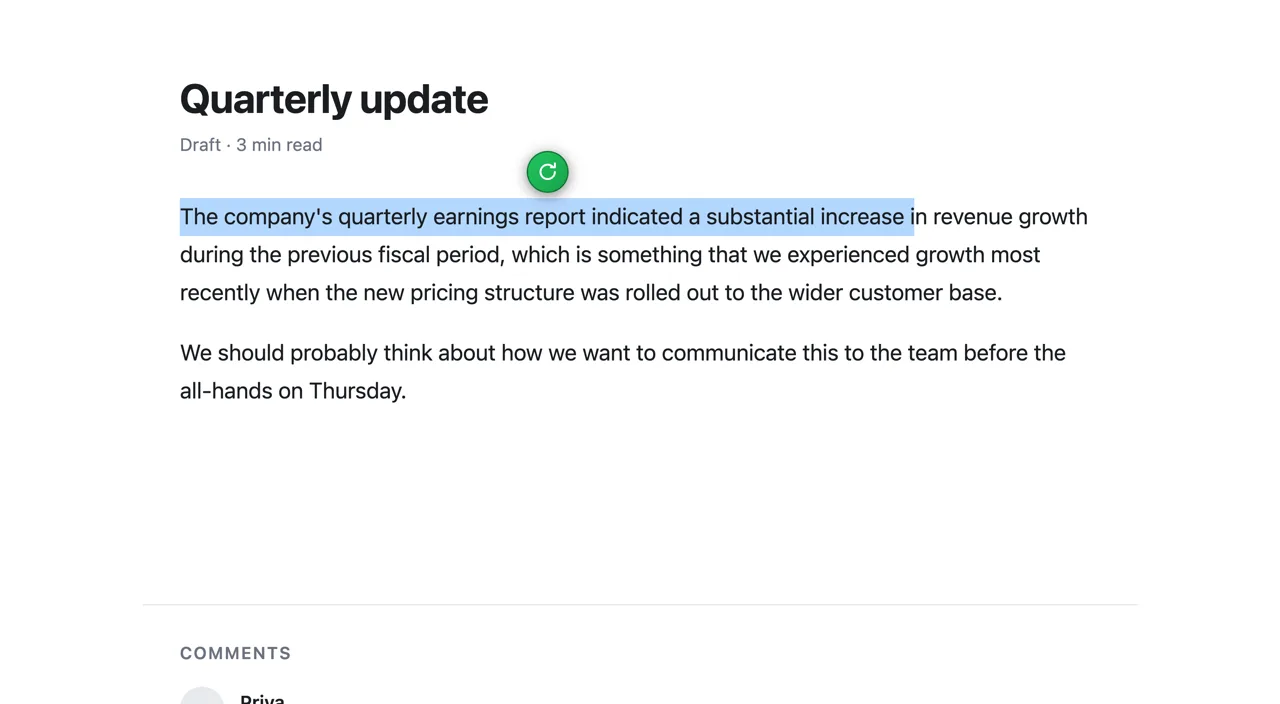
A sentence selected in a draft document, with the green ParaphrasePro bubble sitting just above the selection.
1. Select your textHighlight anything inside a text box — the green bubble appears next to the selection.
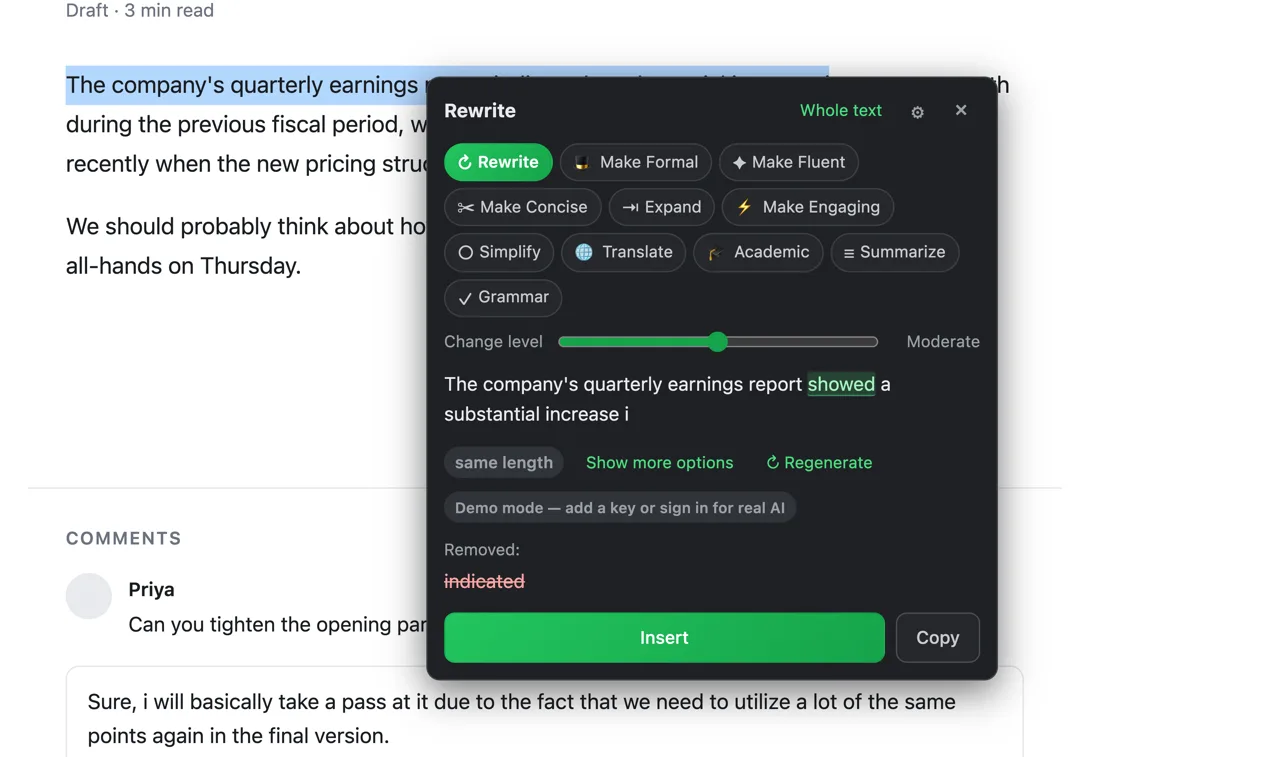
The ParaphrasePro card open over the draft, showing the eleven mode pills, a change-level slider set to Moderate, and a live word-diff of the rewritten sentence.
2. Pick a mode, watch the diffMode pills, a change-level slider, three variants and a word-level diff of what changed.
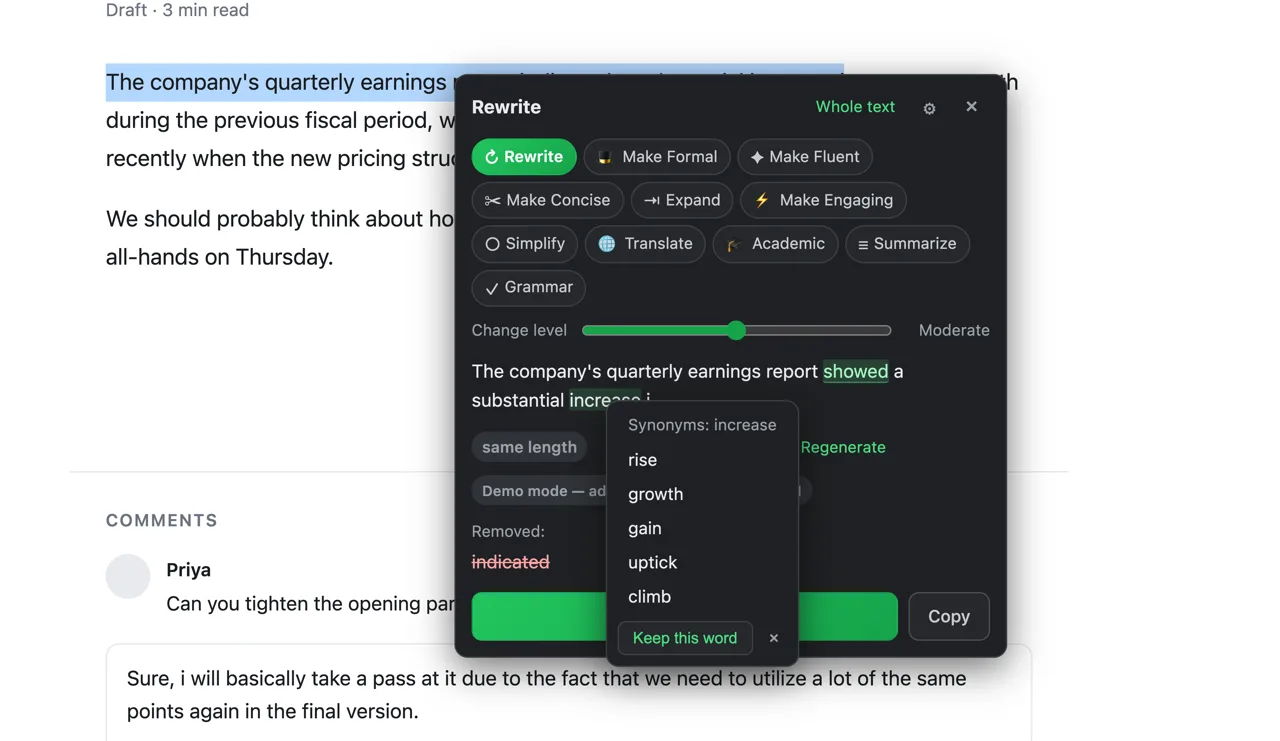
A synonyms popover open on a word inside a ParaphrasePro result, listing alternatives with a Keep this word option.
3. Swap any wordClick a word in the result for synonyms, or freeze it so the AI leaves it alone.
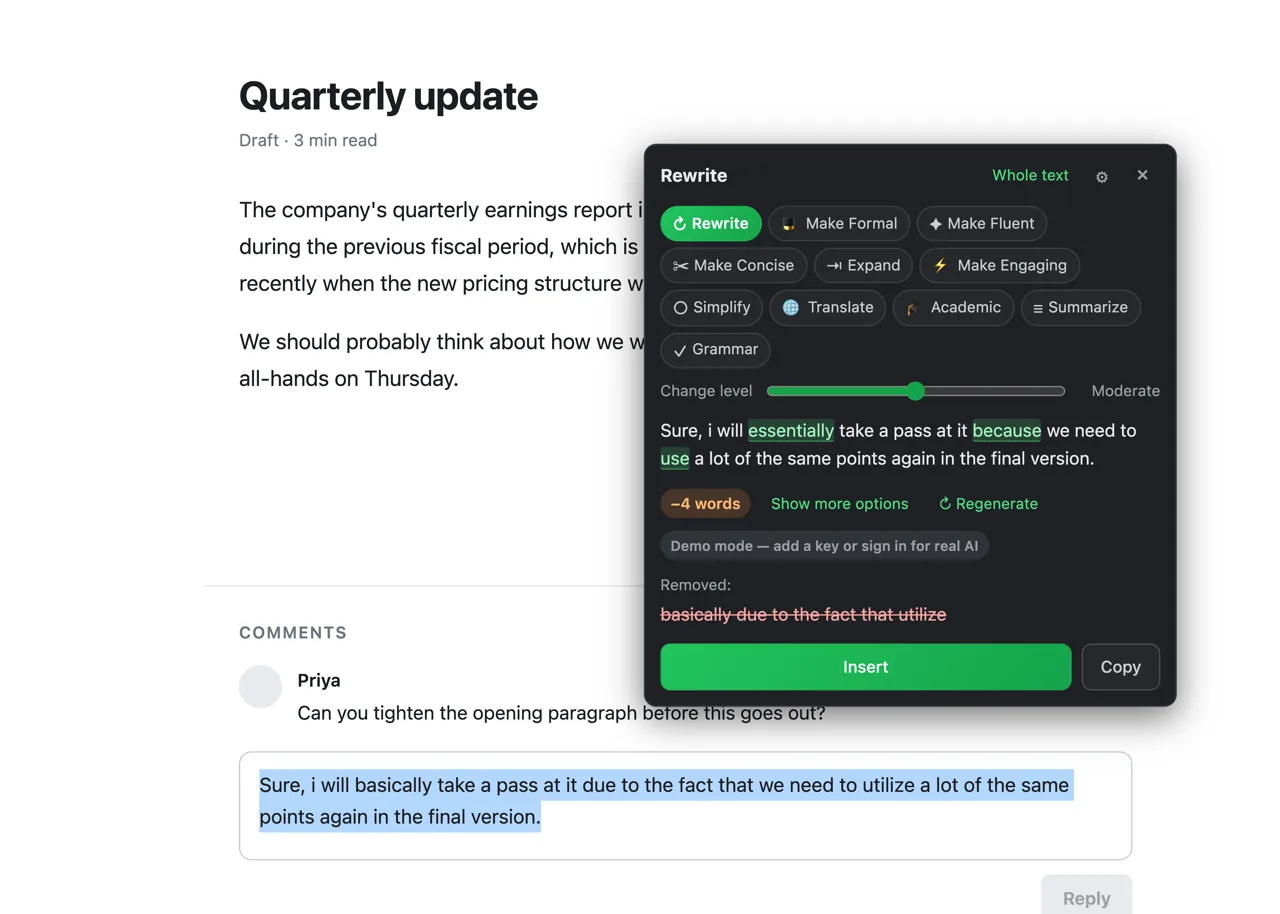
The same ParaphrasePro card open on a comment box further down the page, rewriting a short reply.
4. Same card, every text boxX, LinkedIn, ChatGPT — and every other standard text box. One interface, everywhere you type.
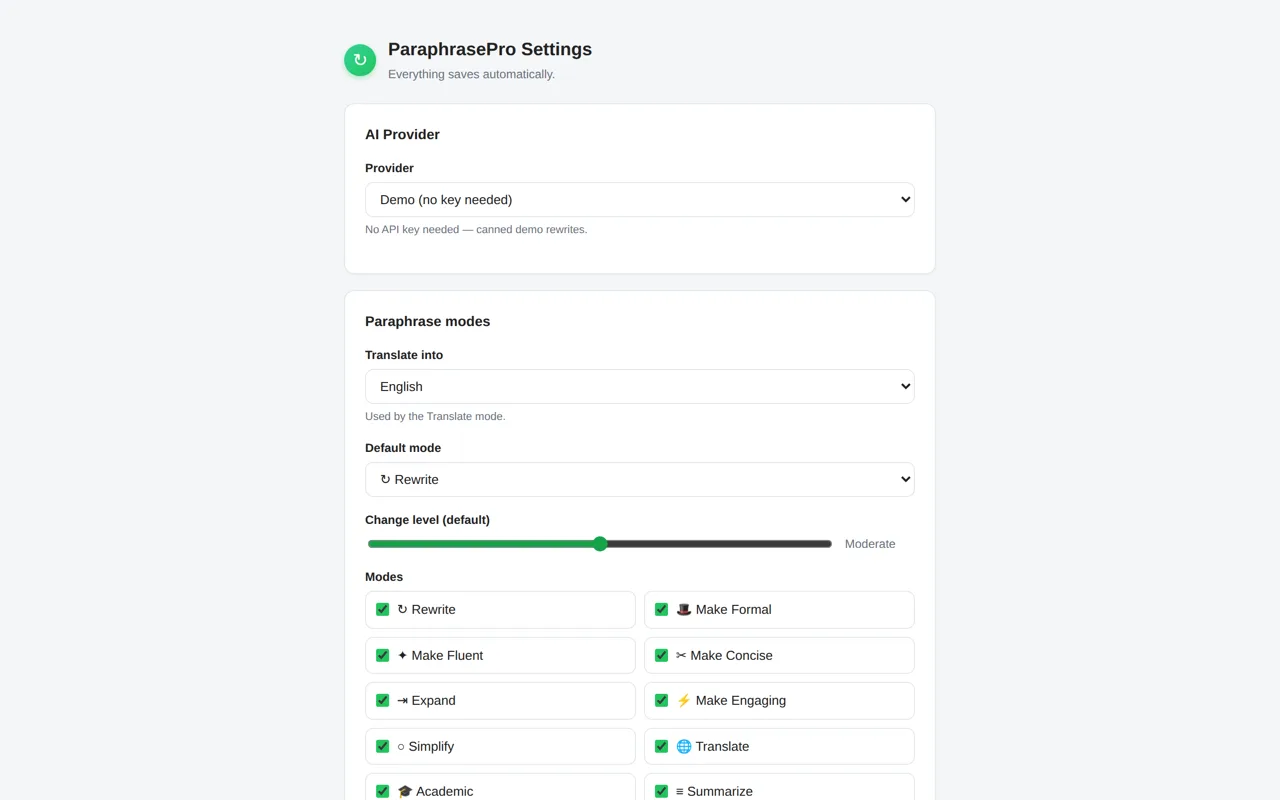
The ParaphrasePro settings page showing the AI provider dropdown and the panel of eleven paraphrase modes.
5. Your model, your rulesStart on the offline demo, then point it at OpenAI, Anthropic, Gemini, DeepSeek, Ollama — or ParaphrasePro Cloud.
Modes

Eleven modes, one bubble

Plus your own custom modes — describe any style and it becomes a pill.

↻Rewrite 🎩Formal ✦Fluent ✂Concise ⇥Expand ⚡Engaging ○Simplify 🌐Translate 🎓Academic ≡Summarize ✓Grammar ✎Your own ↻Rewrite 🎩Formal ✦Fluent ✂Concise ⇥Expand ⚡Engaging ○Simplify 🌐Translate 🎓Academic ≡Summarize ✓Grammar ✎Your own
Compare

How it compares

The experience of premium tools, without the premium price.

ParaphraseProParaphrasePro ProGrammarly ProQuillBot Pro
In-place rewriting (no tabs)✓✓✓✓
Synonym slider / change level✓✓✓✓
Click-a-word synonyms✓✓✗✓
Freeze words✓✓✗✓
Multiple variants per rewrite✓✓✗✗
Grammar check✓✓✓✓
20-language in-place translate✓✓✗✓
Custom modes (your own prompts)✓✓✗✗
Bring your own API key✓✓✗✗
PriceFree$2.99/mo$12/mo$9.95/mo

Deep dives: ParaphrasePro vs Grammarly · ParaphrasePro vs QuillBot

Pricing

Every feature, on every plan

All 11 modes, all 20 languages, no feature gates. The only thing you choose is who pays the AI bill — you, with your own key, or us.

Billing period
Bring your own key

Free

You connect a provider, you pay it directly.

$0 forever
Works with OpenAI, Anthropic, Gemini, DeepSeek and local Ollama.
  • All 11 modes, plus your own custom modes
  • Change level, synonyms, frozen words, variants
  • Whole-text rewriting and undo
  • Works in every standard text box, right where you write
  • No account and no data collection with your own key
  • Or use Cloud's free tier: 10,000 tokens a day, no key needed
Install free
14-day free trial

Pro

We run the AI for you. Nothing to set up.

$2.99 /month
$35.88 a year, billed monthly. Launch price — later signups pay $4.99, yours stays at $2.99.
  • Everything in Free, with zero setup
  • 100,000 tokens a day — enough for heavy daily writing
  • Fast, high-quality models, kept current
  • Priority support

A token is about 4 characters of text, counted across what you send and what comes back — so 10,000 tokens is roughly ten full-length rewrites a day, and 100,000 is around a hundred. Any single rewrite is capped at 12,000 characters on every plan.

For the same daily habit: Grammarly Premium $12/mo · QuillBot Premium $9.95/mo · ParaphrasePro Pro $2.99/mo

Switching

Why people switch

Same daily workflow, a fraction of the price.

From Grammarly

  • Same in-place bubble experience
  • Pay $2.99 instead of $12 — or $0 with your own key
  • Keep using it for grammar: our Grammar mode is included

From QuillBot

  • Same synonym controls, and up to 12,000 characters per rewrite
  • Works inside X, LinkedIn, ChatGPT and every other standard text box — not just a web app
  • Your own key means zero monthly cost if you prefer
FAQ

Questions, answered

Is ParaphrasePro free?

Yes — free forever with your own API key. ParaphrasePro Cloud has a free tier of 10,000 tokens a day (a token is about 4 characters of text) and a Pro plan at $2.99/month with a 14-day free trial.

How is ParaphrasePro different from Grammarly or QuillBot?

Same in-place experience, but you own the cost. Bring any API key and pay the model's raw price — or use Cloud at $2.99/month. No $12/month subscription required.

Which websites does it work in?

Any standard text box on any site — X, LinkedIn, ChatGPT and the rest — including text boxes inside iframes. The bubble appears when you select text inside an editable field (a textarea, an input or a contenteditable editor), not on ordinary page text. Google Docs is not supported: it draws your document on a canvas rather than in a text box, so no extension can read or replace the text there.

Where does my text go?

With your own API key: only to the provider you choose, directly from your browser. With Cloud: to our server, which streams it to the AI model and discards it — we keep no copy of the text itself, only the daily usage total recorded against your account.

Do I need to know how to code?

No. The demo mode works instantly with zero setup. Adding your own key takes 30 seconds in Settings, and Cloud needs no key at all.

Which AI models power it?

Any OpenAI-compatible model. Defaults: DeepSeek v4 Flash (Cloud), GPT-4o mini, Claude Haiku, Gemini Flash — or local models via Ollama/LM Studio.

Does the free trial need a card, and what happens when it ends?

Checkout does ask for a card, and nothing is charged during the 14 days. On day 15 the subscription starts automatically at the price you picked — $2.99/month or $29/year — unless you cancel before then. Cancelling is self-service from your account page and costs you nothing during the trial. The free tier (your own API key, or 10,000 tokens a day on Cloud) needs no card at all.

Can I cancel anytime?

Yes — yourself, from your account page. Cancelling stops future charges and downgrades you cleanly to the free tier at the end of the period you already paid for. No data loss, no lock-in, no dark patterns.

Do you offer refunds?

Yes. Pro starts with a 14-day free trial, and your first payment carries a 14-day money-back guarantee — one email and we'll refund it. Unwanted renewal charges are refundable within 7 days. The one exception is heavy use: past about five full days at the Pro daily limit we refund the unused part of the period instead of the whole charge. Full details in the refund policy.

What languages does the UI support?

English, हिन्दी and Español — with 20 languages available for the Translate mode.

Is there a mobile version?

The extension runs on desktop Chrome (and Chrome-based browsers: Edge, Brave, Arc). Firefox and mobile are on the roadmap.
Your writing, one click better

Install free. First rewrite in under a minute — no signup, no key, no card.

Add to Chrome — free